


ブラウザで銃痕を表示する
~ピストルの銃痕のブックマークレット~
ブラウザの「お気に入り」は
普通はページを開くためのものですが、
実は JavaScriptを登録すると小さなツールとして使うことができます。
こうした仕組みは ブックマークレット と呼ばれます。
今回は遊びネタとして、
ページに銃痕を表示するブックマークレット
を作ってみます。
クリックすると、
ページ内で銃痕が次々と表示されます。
仕組み:ブックマークレット(Bookmarklet)
ブックマークのURL欄に javascript: ... を入れておくと、
そのブックマークをクリックした瞬間に JavaScript が実行されます。
次の JavaScript を使います。長いですが 1行で書かれた JavaScript です。
JavaScript:
javascript:(()=>{const x=80+Math.random()*(innerWidth-160),y=80+Math.random()*(innerHeight-160),s=0.9+Math.random()*0.45,a=Math.random()*360,id="crk_"+Date.now()+"_"+Math.floor(Math.random()*1e6),d=document.createElement("div");d.style.position="fixed";d.style.left="0";d.style.top="0";d.style.width=170*s+"px";d.style.height=170*s+"px";d.style.transform=`translate(${x-85*s}px,${y-85*s}px) rotate(${a}deg)`;d.style.pointerEvents="none";d.style.zIndex="2147483647";d.style.opacity="0";const rays=12;const makeCrack=(ang,len)=>{let path=`M 85 85`;let px=85,py=85;const steps=7+Math.floor(Math.random()*5);for(let i=1;i<=steps;i++){const t=i/steps;const rr=len*t;const wob=(i===steps?0:(Math.random()*10-5));const nx=85+Math.cos(ang)*rr+Math.cos(ang+Math.PI/2)*wob;const ny=85+Math.sin(ang)*rr+Math.sin(ang+Math.PI/2)*wob;path+=` L ${nx.toFixed(1)} ${ny.toFixed(1)}`;px=nx;py=ny;if(i>2&&i<steps&&Math.random()<0.28){const bang=ang+(Math.random()<0.5?-1:1)*(0.35+Math.random()*0.45);const blen=len*(0.08+Math.random()*0.12)*(1-t*0.35);const bx=px+Math.cos(bang)*blen;const by=py+Math.sin(bang)*blen;path+=` M ${px.toFixed(1)} ${py.toFixed(1)} L ${bx.toFixed(1)} ${by.toFixed(1)} M ${px.toFixed(1)} ${py.toFixed(1)}`}}return path};let mainPaths="",shadowPaths="",finePaths="";for(let i=0;i<rays;i++){const ang=(Math.PI*2/rays)*i+(Math.random()*0.18-0.09);const len=46+Math.random()*36;const p=makeCrack(ang,len);mainPaths+=`<path d="${p}" stroke="rgba(70,70,70,.95)" stroke-width="${2.1+Math.random()*0.9}" fill="none" stroke-linecap="round" stroke-linejoin="round"/>`;shadowPaths+=`<path d="${p}" stroke="rgba(0,0,0,.35)" stroke-width="${0.9+Math.random()*0.4}" fill="none" stroke-linecap="round" stroke-linejoin="round"/>`;if(Math.random()<0.85){const ang2=ang+(Math.random()<0.5?-1:1)*(0.12+Math.random()*0.2);const len2=len*(0.45+Math.random()*0.28);const p2=makeCrack(ang2,len2);finePaths+=`<path d="${p2}" stroke="rgba(90,90,90,.65)" stroke-width="${0.8+Math.random()*0.35}" fill="none" stroke-linecap="round" stroke-linejoin="round"/>`}}d.innerHTML=`<svg viewBox="0 0 170 170" width="100%" height="100%" xmlns="http://www.w3.org/2000/svg"><defs><filter id="${id}_shadow"><feDropShadow dx="1" dy="1.5" stdDeviation="1.2" flood-opacity=".28"/></filter></defs><g filter="url(#${id}_shadow)">${shadowPaths}${mainPaths}${finePaths}<circle cx="85" cy="85" r="5.5" fill="rgba(8,8,8,.96)"/><circle cx="85" cy="85" r="2.8" fill="rgba(0,0,0,1)"/><circle cx="82.5" cy="82.5" r="10" fill="rgba(255,255,255,.05)"/><circle cx="85" cy="85" r="12.5" fill="none" stroke="rgba(0,0,0,.25)" stroke-width="1.3"/><circle cx="85" cy="85" r="16.5" fill="none" stroke="rgba(0,0,0,.15)" stroke-width="0.9"/></g></svg>`;document.body.appendChild(d);requestAnimationFrame(()=>{d.style.transition="opacity .05s ease-out";d.style.opacity="1";d.animate([{transform:`translate(${x-85*s}px,${y-85*s}px) rotate(${a}deg) scale(1.14)`},{transform:`translate(${x-85*s}px,${y-85*s}px) rotate(${a}deg) scale(1)`}],{duration:95,easing:"ease-out"})});})();
手順:
① どんなページでもいいので、いったんお気に入りに登録する。
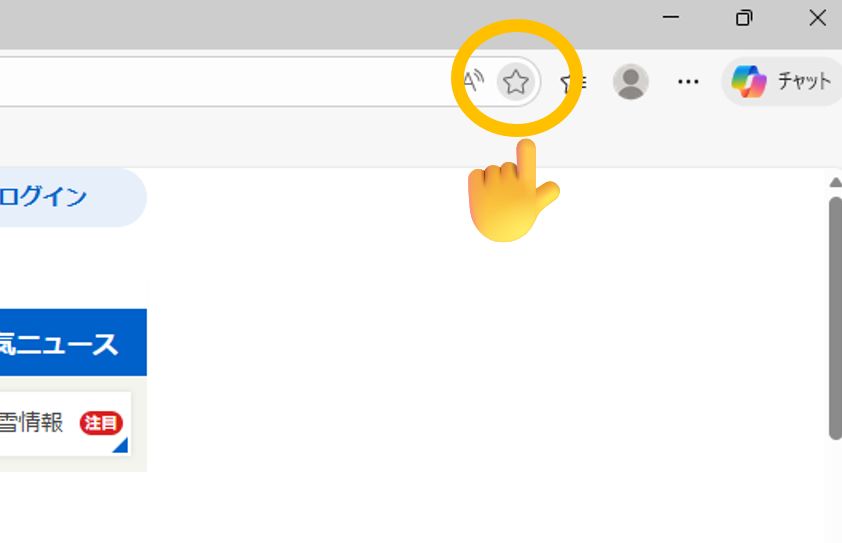
② 登録したお気に入りを右クリックして、「編集」をクリック。
③ 先ほど紹介した JavaScript をコピーする。
④ 名前を「ピストル」にして、U」にして、URL欄に JavaScript を貼り付ける。
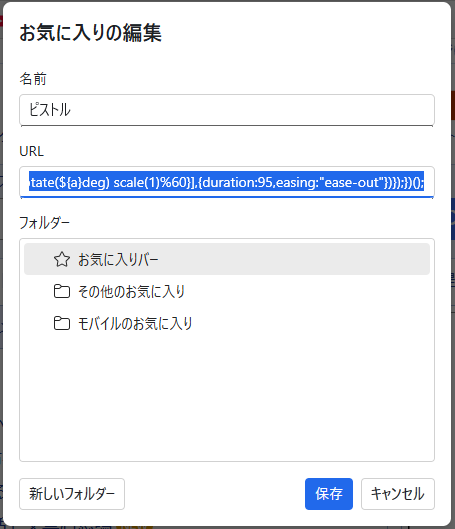
これで完成です。
たとえば、Yahooページでお気に入りをクリックすると…
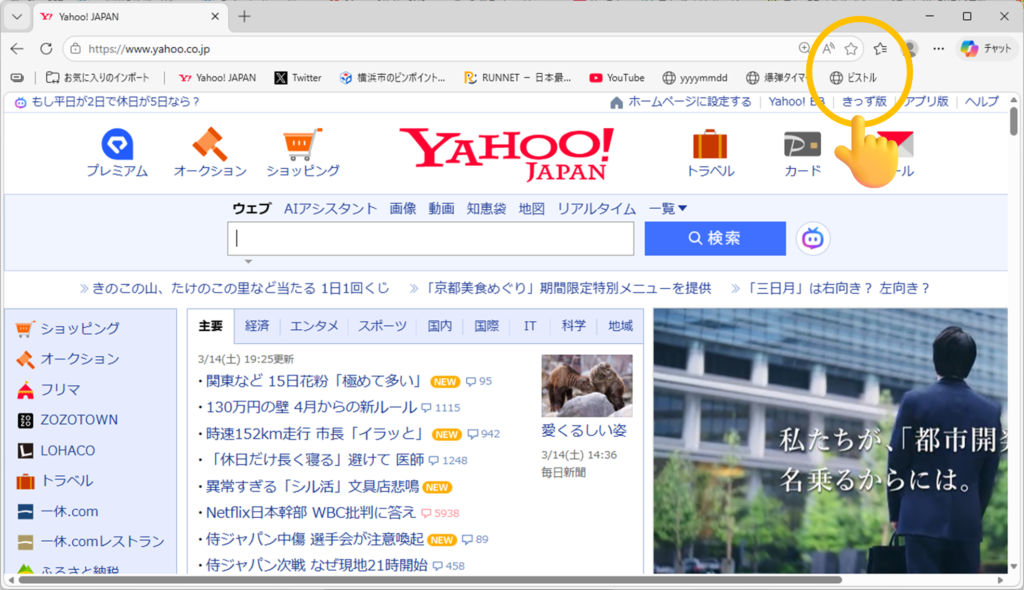
爆弾タイマーが始動します!
動画:



コメントを残す