


ブラウザで風船
~風船を飛ばすのブックマークレット~
ブラウザの「お気に入り」は
普通はページを開くためのものですが、
実は JavaScriptを登録すると小さなツールとして使うことができます。
こうした仕組みは ブックマークレット と呼ばれます。
今回は遊びネタとして、
ページに風船を飛ばすブックマークレット
を作ってみます。
クリックすると、
ページ内で風船が次々と飛びます。
仕組み:ブックマークレット(Bookmarklet)
ブックマークのURL欄に javascript: ... を入れておくと、
そのブックマークをクリックした瞬間に JavaScript が実行されます。
次の JavaScript を使います。長いですが 1行で書かれた JavaScript です。
JavaScript:
javascript:(()=>{const L="__balloon_layer__",A="__balloon_actors__";let layer=document.getElementById(L);if(!layer){layer=document.createElement("div");layer.id=L;layer.style.position="fixed";layer.style.inset="0";layer.style.pointerEvents="none";layer.style.zIndex="2147483647";document.body.appendChild(layer);window[A]=[];if(!window.__balloonRAF__){const tick=(now)=>{const arr=window[A]||[];const imgs=[...document.images].filter(img=>{const r=img.getBoundingClientRect();return r.width>30&&r.height>30&&r.bottom>0&&r.right>0&&r.top<innerHeight&&r.left<innerWidth});for(let i=arr.length-1;i>=0;i--){const b=arr[i];b.x+=b.vx;b.y+=b.vy;b.vx+=Math.sin((now+b.phase)/600)*0.02;b.el.style.transform=`translate(${b.x}px,${b.y}px)`;let hit=false;for(const img of imgs){const r=img.getBoundingClientRect();const cx=b.x+b.w/2,cy=b.y+b.h/2;if(cx>r.left&&cx<r.right&&cy>r.top&&cy<r.bottom){hit=true;const p=document.createElement("div");p.style.position="fixed";p.style.left=(cx-35)+"px";p.style.top=(cy-35)+"px";p.style.width="70px";p.style.height="70px";p.innerHTML=`<svg viewBox="0 0 100 100"><g stroke="white" stroke-width="3"><line x1="50" y1="50" x2="10" y2="10"/><line x1="50" y1="50" x2="90" y2="10"/><line x1="50" y1="50" x2="10" y2="90"/><line x1="50" y1="50" x2="90" y2="90"/></g></svg>`;layer.appendChild(p);p.animate([{transform:"scale(.5)",opacity:1},{transform:"scale(1.5)",opacity:0}],{duration:300}).onfinish=()=>p.remove();b.el.remove();arr.splice(i,1);break}}if(hit)continue;if(b.y+b.h<0){b.el.remove();arr.splice(i,1)}}window.__balloonRAF__=requestAnimationFrame(tick)};window.__balloonRAF__=requestAnimationFrame(tick)}}const colors=["#ff3b3b","#2f7bff","#ffd400","#2ecc40"];const color=colors[Math.floor(Math.random()*colors.length)];const x=20+Math.random()*(innerWidth-100);const size=60+Math.random()*40;const el=document.createElement("div");el.style.position="fixed";el.style.width=size+"px";el.style.height=(size*1.5)+"px";el.style.pointerEvents="none";el.innerHTML=`<svg viewBox="0 0 80 120" width="${size}" height="${size*1.5}"><ellipse cx="40" cy="45" rx="26" ry="34" fill="${color}"/><ellipse cx="30" cy="30" rx="8" ry="12" fill="rgba(255,255,255,.4)"/><path d="M36 80 L40 88 L44 80 Z" fill="${color}"/><path d="M40 88 C40 100,45 105,42 115" stroke="black" stroke-width="2" fill="none"/></svg>`;layer.appendChild(el);(window[A]=window[A]||[]).push({el,x,y:innerHeight+20,w:size,h:size*1.5,vx:(Math.random()*1-.5),vy:-(1.5+Math.random()*2),phase:Math.random()*1000})})();
手順:
① どんなページでもいいので、いったんお気に入りに登録する。
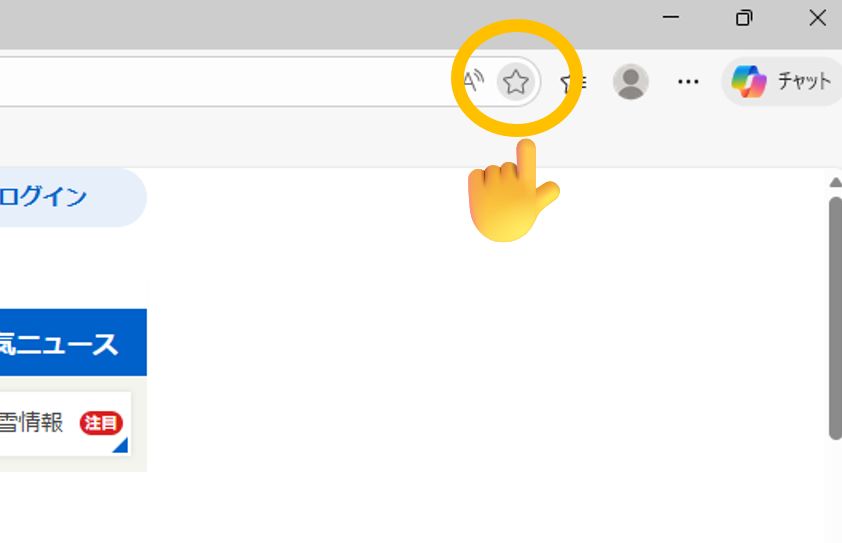
② 登録したお気に入りを右クリックして、「編集」をクリック。
③ 先ほど紹介した JavaScript をコピーする。
④ 名前を「バルーン」にして、URL欄に JavaScript を貼り付ける。
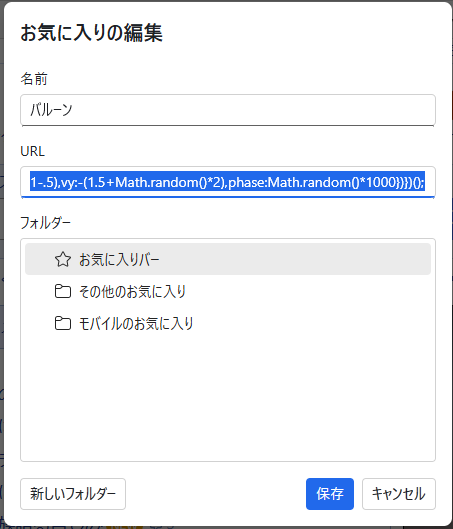
これで完成です。
たとえば、Yahooページでお気に入りをクリックすると…
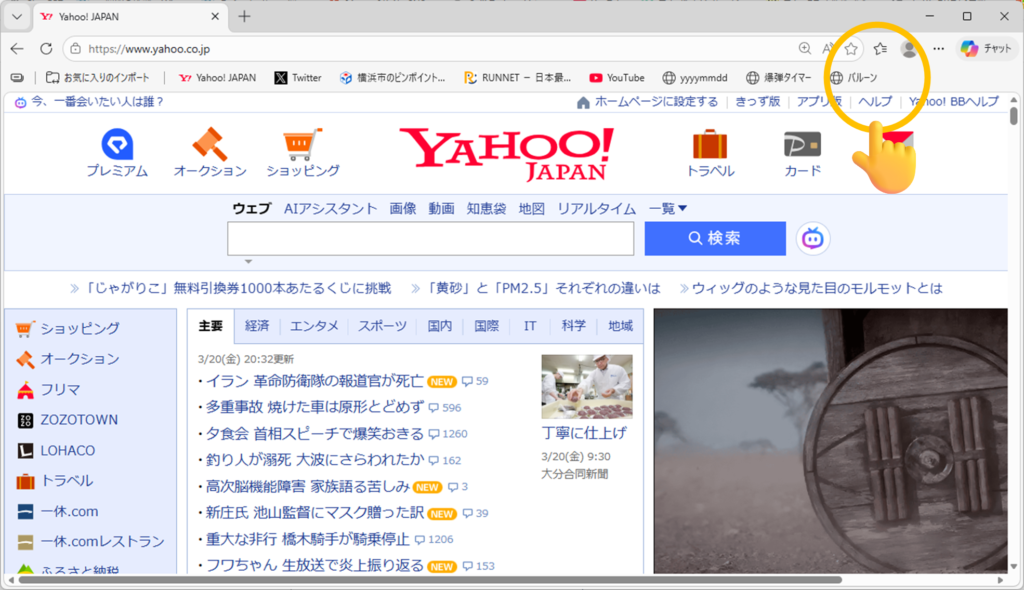
風船がどんどん飛びます!!
動画:


コメントを残す