


ブラウザでインベーター
~インベーターがウロウロしながら迫ってくるブックマークレット~
ブラウザの「お気に入り」は
普通はページを開くためのものですが、
実は JavaScriptを登録すると小さなツールとして使うことができます。
こうした仕組みは ブックマークレット と呼ばれます。
今回は遊びネタとして、
ページにインベーダーを登場させるブックマークレット
を作ってみます。
クリックすると、
ページ内でインベーダーが迫ってきます。
仕組み:ブックマークレット(Bookmarklet)
ブックマークのURL欄に javascript: ... を入れておくと、
そのブックマークをクリックした瞬間に JavaScript が実行されます。
次の JavaScript を使います。長いですが 1行で書かれた JavaScript です。
JavaScript:
javascript:(()=>{const KEY="__invader_rows_step_state__";if(!window[KEY]){const layer=document.createElement("div");layer.id="__invader_rows_layer__";layer.style.position="fixed";layer.style.inset="0";layer.style.pointerEvents="none";layer.style.zIndex="2147483647";document.body.appendChild(layer);const palette=["#7CFF00","#00E5FF","#FFD400","#FF5CF0","#FF6B6B","#9BFF7A","#8AB4FF"];const svgA=c=>%60<svg viewBox="0 0 60 40" width="36" height="24" xmlns="http://www.w3.org/2000/svg"><g fill="${c}"><rect x="22" y="2" width="16" height="6"/><rect x="16" y="8" width="28" height="6"/><rect x="10" y="14" width="40" height="6"/><rect x="4" y="20" width="12" height="6"/><rect x="20" y="20" width="20" height="6"/><rect x="44" y="20" width="12" height="6"/><rect x="4" y="26" width="8" height="6"/><rect x="16" y="26" width="8" height="6"/><rect x="36" y="26" width="8" height="6"/><rect x="48" y="26" width="8" height="6"/><rect x="16" y="32" width="8" height="6"/><rect x="36" y="32" width="8" height="6"/></g></svg>%60;const svgB=c=>%60<svg viewBox="0 0 60 40" width="36" height="24" xmlns="http://www.w3.org/2000/svg"><g fill="${c}"><rect x="22" y="2" width="16" height="6"/><rect x="16" y="8" width="28" height="6"/><rect x="10" y="14" width="40" height="6"/><rect x="4" y="20" width="12" height="6"/><rect x="20" y="20" width="20" height="6"/><rect x="44" y="20" width="12" height="6"/><rect x="10" y="26" width="8" height="6"/><rect x="20" y="26" width="8" height="6"/><rect x="32" y="26" width="8" height="6"/><rect x="42" y="26" width="8" height="6"/><rect x="8" y="32" width="8" height="6"/><rect x="44" y="32" width="8" height="6"/></g></svg>%60;window[KEY]={layer,rows:[],palette,pose:0,dir:1,stepsInDir:0,lastMove:performance.now(),lastPose:performance.now(),moveInterval:1000,poseInterval:500,stepY:52,count:7,w:36,g:14};window.__inv_make_row__=color=>{const st=window[KEY],total=st.count*st.w+(st.count-1)*st.g,startX=Math.max(8,(innerWidth-total)/2),row=document.createElement("div");row.style.position="fixed";row.style.left=startX+"px";row.style.top="10px";row.style.width=total+"px";row.style.height="26px";row.style.display="flex";row.style.gap=st.g+"px";row.style.pointerEvents="none";for(let i=0;i<st.count;i++){const cell=document.createElement("div");cell.style.width=st.w+"px";cell.style.height="24px";cell.innerHTML=svgA(color);row.appendChild(cell)}layer.appendChild(row);st.rows.push({el:row,x:startX,y:10,color})};window.__inv_apply_pose__=()=>{const st=window[KEY],maker=st.pose?svgB:svgA;st.rows.forEach(r=>{[...r.el.children].forEach(cell=>cell.innerHTML=maker(r.color))})};window.__inv_tick__=now=>{const st=window[KEY];if(now-st.lastPose>=st.poseInterval){st.pose=1-st.pose;st.lastPose=now;window.__inv_apply_pose__()}if(now-st.lastMove>=st.moveInterval){const dx=(st.w+st.g)*st.dir;st.rows.forEach(r=>{r.x+=dx;r.x=Math.max(8,Math.min(innerWidth-r.el.offsetWidth-8,r.x));r.el.style.left=r.x+"px"});st.stepsInDir++;st.lastMove=now;if(st.stepsInDir>=5){st.stepsInDir=0;st.dir*=-1}}window.__invaderStepRAF__=requestAnimationFrame(window.__inv_tick__)};window.__invaderStepRAF__=requestAnimationFrame(window.__inv_tick__)}const st=window[KEY];st.rows.forEach(r=>{r.y+=st.stepY;if(r.y<innerHeight-30)r.el.style.top=r.y+"px"});window.__inv_make_row__(st.palette[st.rows.length%st.palette.length])})();
手順:
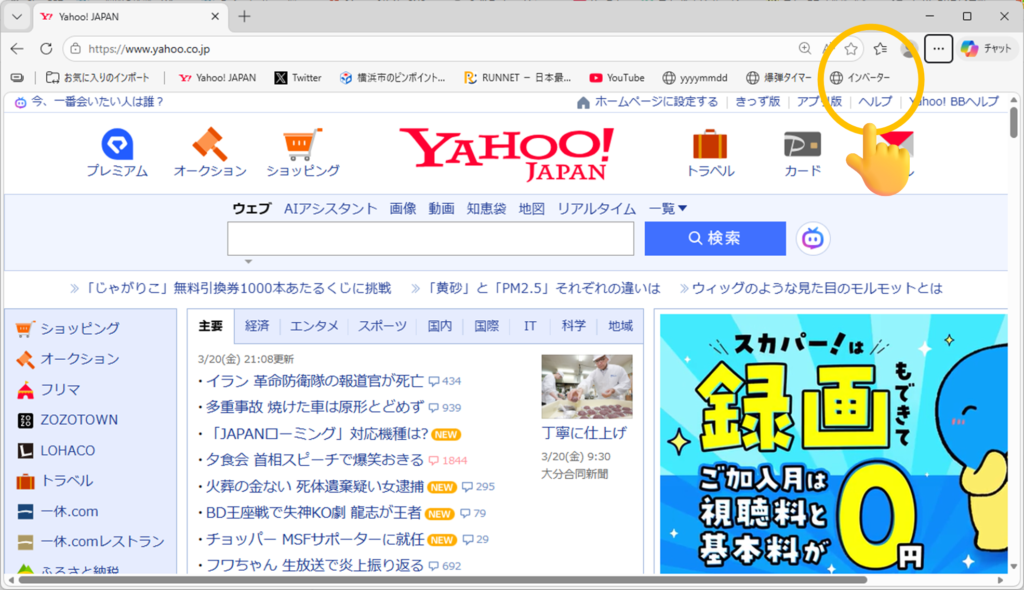
① どんなページでもいいので、いったんお気に入りに登録する。
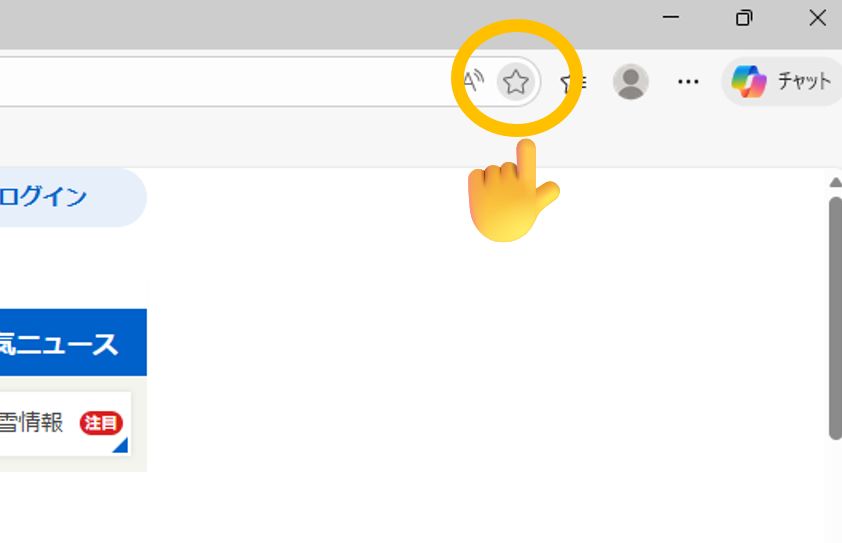
② 登録したお気に入りを右クリックして、「編集」をクリック。
③ 先ほど紹介した JavaScript をコピーする。
④ 名前を「インベーダー」にして、URL欄に JavaScript を貼り付ける。
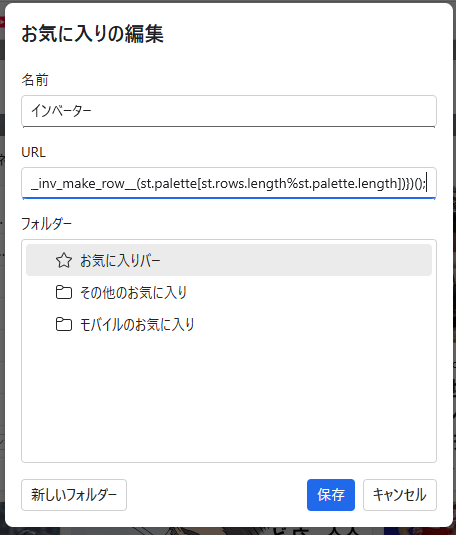
これで完成です。
たとえば、Yahooページでお気に入りをクリックすると…
インベーダーがどんどん迫ってきます!!
動画:



コメントを残す