


ブラウザで迷路を作成
~迷路のブックマークレット~
ブラウザの「お気に入り」は
普通はページを開くためのものですが、
実は JavaScriptを登録すると小さなツールとして使うことができます。
こうした仕組みは ブックマークレット と呼ばれます。
今回は遊びネタとして、
ページにス迷路を登場させるブックマークレット
を作ってみます。
クリックすると、
ページ内で迷路が登場し、ボールがさまよい出します。
仕組み:ブックマークレット(Bookmarklet)
ブックマークのURL欄に javascript: ... を入れておくと、
そのブックマークをクリックした瞬間に JavaScript が実行されます。
次の JavaScript を使います。長いですが 1行で書かれた JavaScript です。
JavaScript:
javascript:(()=>{const old=document.getElementById('__maze_bookmarklet__');if(old)old.remove();const wrap=document.createElement('div');wrap.id='__maze_bookmarklet__';wrap.style='position:fixed;inset:0;z-index:2147483647;pointer-events:none';const c=document.createElement('canvas');c.width=innerWidth;c.height=innerHeight;c.style='width:100vw;height:100vh';wrap.appendChild(c);document.body.appendChild(wrap);const x=c.getContext('2d');const cols=Math.max(10,Math.min(28,Math.floor(innerWidth/64))),rows=Math.max(8,Math.min(18,Math.floor(innerHeight/64)));const size=Math.floor(Math.min((innerWidth-80)/cols,(innerHeight-100)/rows));const ox=Math.floor((innerWidth-cols*size)/2),oy=Math.floor((innerHeight-rows*size)/2);const N=cols*rows;const cells=Array.from({length:N},()=>({w:[1,1,1,1],v:0}));const idx=(cx,cy)=>cy*cols+cx;const neigh=(cx,cy)=>[[cx,cy-1,0,2],[cx+1,cy,1,3],[cx,cy+1,2,0],[cx-1,cy,3,1]].filter(([nx,ny])=>nx>=0&&ny>=0&&nx<cols&&ny<rows);let st=[[0,0]],order=[];cells[0].v=1;while(st.length){const [cx,cy]=st[st.length-1];order.push([cx,cy]);const ns=neigh(cx,cy).filter(([nx,ny])=>!cells[idx(nx,ny)].v);if(ns.length){const [nx,ny,d,od]=ns[Math.random()*ns.length|0];cells[idx(cx,cy)].w[d]=0;cells[idx(nx,ny)].w[od]=0;cells[idx(nx,ny)].v=1;st.push([nx,ny]);}else st.pop();}for(const q of cells)delete q.v;const start=[0,0],end=[cols-1,rows-1];const prev=Array(N).fill(-1),q=[0];prev[0]=0;for(let h=0;h<q.length;h++){const i=q[h],cx=i%cols,cy=(i/cols)|0;if(i===idx(...end))break;for(const [nx,ny,d] of neigh(cx,cy)){const ni=idx(nx,ny);if(!cells[i].w[d]&&prev[ni]===-1){prev[ni]=i;q.push(ni);}}}let path=[idx(...end)];while(path[0]!==0)path.unshift(prev[path[0]]);const pts=path.map(i=>[ox+(i%cols)*size+size/2,oy+((i/cols)|0)*size+size/2]);const drawDur=2600,moveDur=Math.max(2600,pts.length*140),stay=1200,t0=performance.now();const ease=t=>t<.5?2*t*t:1-Math.pow(-2*t+2,2)/2;const lerp=(a,b,t)=>a+(b-a)*t;function drawMaze(reveal){x.lineWidth=3;x.lineCap=%27round%27;x.lineJoin=%27round%27;x.strokeStyle=%27rgba(20,20,20,.92)%27;for(let n=0;n<reveal;n++){const [cx,cy]=order[n],cell=cells[idx(cx,cy)],px=ox+cx*size,py=oy+cy*size;if(cell.w[0]){x.beginPath();x.moveTo(px,py);x.lineTo(px+size,py);x.stroke();}if(cell.w[1]){x.beginPath();x.moveTo(px+size,py);x.lineTo(px+size,py+size);x.stroke();}if(cell.w[2]){x.beginPath();x.moveTo(px,py+size);x.lineTo(px+size,py+size);x.stroke();}if(cell.w[3]){x.beginPath();x.moveTo(px,py);x.lineTo(px,py+size);x.stroke();}}x.fillStyle=%27rgba(255,255,255,.88)%27;x.font=`bold ${Math.max(14,size*.22)}px sans-serif`;x.fillText(%27START%27,ox+6,oy-10);const tw=x.measureText(%27END%27).width;x.fillText(%27END%27,ox+cols*size-tw-6,oy+rows*size+22);}function ballPos(t){if(t<=0)return pts[0];if(t>=1)return pts[pts.length-1];const seg=(pts.length-1)*t,si=Math.min(pts.length-2,seg|0),lt=ease(seg-si),a=pts[si],b=pts[si+1];let px=lerp(a[0],b[0],lt),py=lerp(a[1],b[1],lt);const dx=b[0]-a[0],dy=b[1]-a[1],len=Math.hypot(dx,dy)||1;const nx=-dy/len,ny=dx/len,w=Math.sin(t*Math.PI*pts.length)*Math.min(2,size*.06);px+=nx*w;py+=ny*w;return [px,py,Math.atan2(dy,dx)];}function tick(now){const e=now-t0;x.clearRect(0,0,c.width,c.height);x.fillStyle=%27rgba(255,255,255,.08)%27;x.fillRect(0,0,c.width,c.height);const reveal=Math.max(1,Math.min(order.length,Math.floor(order.length*(e/drawDur))));drawMaze(reveal);if(e>drawDur*.55){const mt=Math.min(1,Math.max(0,(e-drawDur*.55)/moveDur));const [bx,by,ang]=ballPos(mt);const r=Math.max(7,size*.16);x.save();x.translate(bx,by);x.rotate(ang+(e/140));const g=x.createRadialGradient(-r*.3,-r*.35,r*.15,0,0,r);g.addColorStop(0,%27#fff');g.addColorStop(.35,'#9fd3ff');g.addColorStop(1,'#2d68b2');x.fillStyle='rgba(0,0,0,.18)';x.beginPath();x.ellipse(0,r*.95,r*.95,r*.38,0,0,Math.PI*2);x.fill();x.fillStyle=g;x.beginPath();x.arc(0,0,r,0,Math.PI*2);x.fill();x.strokeStyle='rgba(255,255,255,.5)';x.lineWidth=1.2;x.beginPath();x.moveTo(-r*.7,-r*.1);x.lineTo(r*.7,-r*.1);x.moveTo(-r*.45,r*.45);x.lineTo(r*.45,r*.45);x.stroke();x.restore();if(mt>=1){x.fillStyle='rgba(30,120,40,.92)';x.font=%60bold ${Math.max(20,size*.32)}px sans-serif%60;const msg='CLEAR!';const mw=x.measureText(msg).width;x.fillText(msg,innerWidth/2-mw/2,oy-26);}}if(e<drawDur+moveDur+stay)requestAnimationFrame(tick);else wrap.remove();}requestAnimationFrame(tick);})();
手順:
① どんなページでもいいので、いったんお気に入りに登録する。
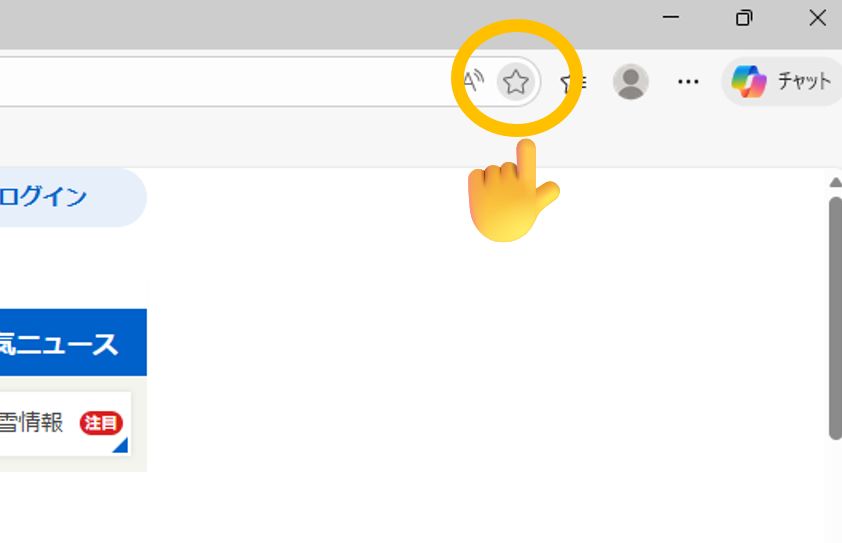
② 登録したお気に入りを右クリックして、「編集」をクリック。
③ 先ほど紹介した JavaScript をコピーする。
④ 名前を「迷路」にして、URL欄に JavaScript を貼り付ける。
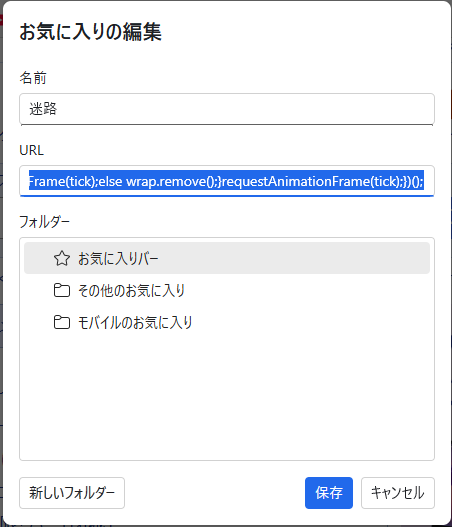
これで完成です。
たとえば、Yahooページでお気に入りをクリックすると…
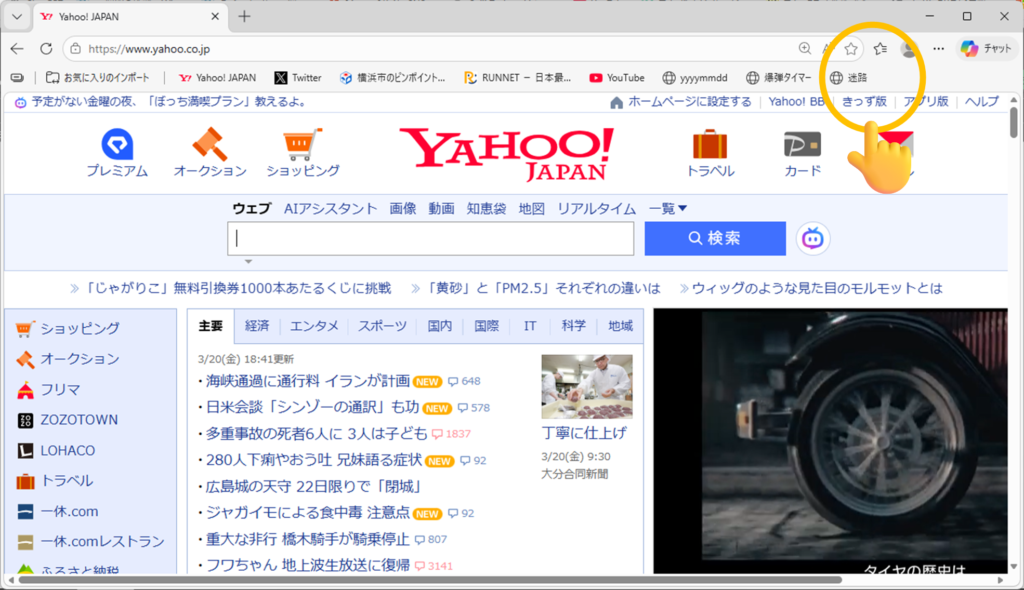
迷路が登場します!
動画:


コメントを残す