


ブラウザでパラシューター
~パラシューターのブックマークレット~
ブラウザの「お気に入り」は
普通はページを開くためのものですが、
実は JavaScriptを登録すると小さなツールとして使うことができます。
こうした仕組みは ブックマークレット と呼ばれます。
今回は遊びネタとして、
ページにパラシューターを登場させるブックマークレット
を作ってみます。
クリックすると、
ページ内でパラシューターが次々と登場します。
仕組み:ブックマークレット(Bookmarklet)
ブックマークのURL欄に javascript: ... を入れておくと、
そのブックマークをクリックした瞬間に JavaScript が実行されます。
次の JavaScript を使います。長いですが 1行で書かれた JavaScript です。
JavaScript:
javascript:(()=>{const L="__para_warrior_layer__",A="__para_warrior_actors__";let layer=document.getElementById(L);if(!layer){layer=document.createElement("div");layer.id=L;layer.style.position="fixed";layer.style.inset="0";layer.style.pointerEvents="none";layer.style.zIndex="2147483647";document.body.appendChild(layer);const bed=document.createElement("div");bed.style.position="fixed";bed.style.left="0";bed.style.bottom="0";bed.style.width="100vw";bed.style.height="70px";bed.style.background="linear-gradient(180deg,rgba(92,58,34,.0),rgba(92,58,34,.0) 12px,#7a5230 12px,#6a4527 100%)";bed.innerHTML=`<svg viewBox="0 0 1200 70" width="100%" height="70" xmlns="http://www.w3.org/2000/svg"><g>${Array.from({length:46},(_,i)=>{const x=10+i*26+Math.random()*10,h=12+Math.random()*14,c=["#ff5b7f","#ffd84d","#7ddc66","#7dc7ff","#d98cff"][Math.floor(Math.random()*5)];return`<g transform="translate(${x},0)"><path d="M10 58 L10 ${46-h}" stroke="#3d8b3d" stroke-width="2"/><circle cx="10" cy="${42-h}" r="5" fill="${c}"/><circle cx="5" cy="${46-h/1.2}" r="4" fill="${c}"/><circle cx="15" cy="${46-h/1.2}" r="4" fill="${c}"/></g>`}).join("")}</g></svg>`;layer.appendChild(bed);window[A]=[];if(!window.__paraWarRAF__){const tick=now=>{const arr=window[A]||[];for(let i=arr.length-1;i>=0;i--){const w=arr[i];if(w.state==="drop"){w.vy=Math.min(w.vy+.012,1.1);w.y+=w.vy;w.swing+=0.045;w.x+=Math.sin(w.swing)*.35;if(w.y>=w.landY){w.y=w.landY;w.state="run";w.runDir=w.x<innerWidth/2?-1:1;w.vx=(1.6+Math.random()*1.4)*w.runDir;w.el.querySelector('[data-chute="1"]').style.opacity="0";w.el.querySelector('[data-rope="1"]').style.opacity="0";w.el.querySelector('[data-man="1"]').setAttribute("transform","translate(0,0)")}else{const bob=Math.sin(w.swing)*4;w.el.querySelector('[data-man="1"]').setAttribute("transform",`translate(${bob.toFixed(1)},0)`)}w.el.style.transform=`translate(${w.x}px,${w.y}px)`}else{w.step+=0.32;w.x+=w.vx;const leg1=Math.sin(w.step)*8,leg2=Math.sin(w.step+Math.PI)*8;const g=w.el.querySelector('[data-legs="1"]');g.innerHTML=`<line x1="36" y1="93" x2="${(36+leg1).toFixed(1)}" y2="105" stroke="#2b2b2b" stroke-width="3" stroke-linecap="round"/><line x1="48" y1="93" x2="${(48+leg2).toFixed(1)}" y2="105" stroke="#2b2b2b" stroke-width="3" stroke-linecap="round"/>`;w.el.style.transform=`translate(${w.x}px,${w.y}px)`;if(w.x<-90||w.x>innerWidth+90){w.el.remove();arr.splice(i,1)}}}window.__paraWarRAF__=requestAnimationFrame(tick)};window.__paraWarRAF__=requestAnimationFrame(tick)}}const colors=[["#3b82f6","#1d4ed8"],["#ef4444","#991b1b"],["#22c55e","#166534"],["#f59e0b","#b45309"],["#a855f7","#6d28d9"]];const pick=colors[Math.floor(Math.random()*colors.length)],startX=30+Math.random()*(innerWidth-120),startY=-90,landY=innerHeight-110;const el=document.createElement("div");el.style.position="fixed";el.style.left="0";el.style.top="0";el.style.width="84px";el.style.height="110px";el.style.pointerEvents="none";el.style.filter="drop-shadow(0 6px 8px rgba(0,0,0,.18))";el.innerHTML=`<svg viewBox="0 0 84 110" width="84" height="110" xmlns="http://www.w3.org/2000/svg"><g data-chute="1"><path d="M8 28 Q42 -2 76 28" fill="${pick[0]}" stroke="${pick[1]}" stroke-width="2"/><path d="M16 28 Q42 8 68 28" fill="rgba(255,255,255,.18)"/><line x1="18" y1="28" x2="30" y2="56" stroke="#666" stroke-width="1.5"/><line x1="42" y1="24" x2="42" y2="56" stroke="#666" stroke-width="1.5"/><line x1="66" y1="28" x2="54" y2="56" stroke="#666" stroke-width="1.5"/></g><g data-rope="1"><line x1="30" y1="56" x2="42" y2="62" stroke="#666" stroke-width="1.3"/><line x1="42" y1="56" x2="42" y2="62" stroke="#666" stroke-width="1.3"/><line x1="54" y1="56" x2="42" y2="62" stroke="#666" stroke-width="1.3"/></g><g data-man="1" transform="translate(0,0)"><circle cx="42" cy="68" r="7" fill="#f2c29b"/><rect x="34" y="75" width="16" height="18" rx="3" fill="${pick[1]}"/><line x1="34" y1="80" x2="26" y2="90" stroke="#2b2b2b" stroke-width="3" stroke-linecap="round"/><line x1="50" y1="80" x2="58" y2="90" stroke="#2b2b2b" stroke-width="3" stroke-linecap="round"/><g data-legs="1"><line x1="36" y1="93" x2="32" y2="105" stroke="#2b2b2b" stroke-width="3" stroke-linecap="round"/><line x1="48" y1="93" x2="52" y2="105" stroke="#2b2b2b" stroke-width="3" stroke-linecap="round"/></g></g></svg>`;layer.appendChild(el);(window[A]=window[A]||[]).push({el,x:startX,y:startY,landY,vy:.45,swing:Math.random()*6.28,state:"drop",step:0,vx:0});})();
手順:
① どんなページでもいいので、いったんお気に入りに登録する。
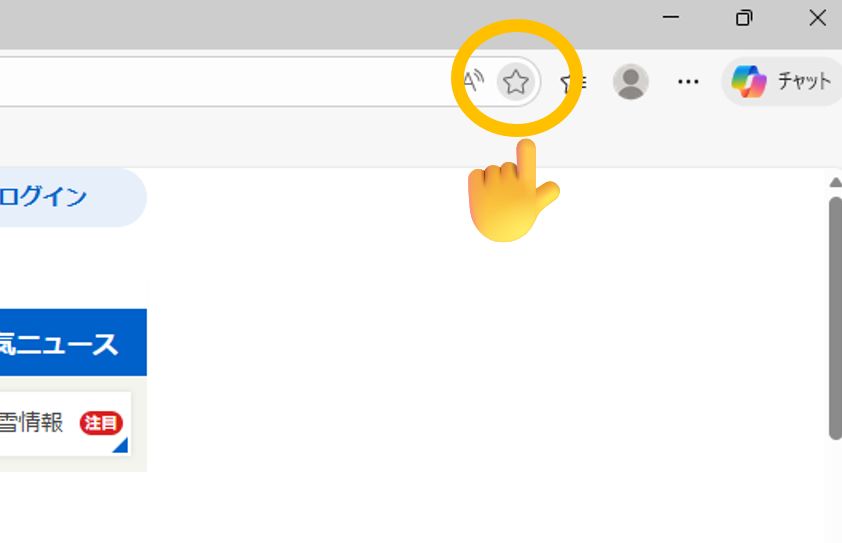
② 登録したお気に入りを右クリックして、「編集」をクリック。
③ 先ほど紹介した JavaScript をコピーする。
④ 名前を「パラシューター」にして、URL欄に JavaScript を貼り付ける。
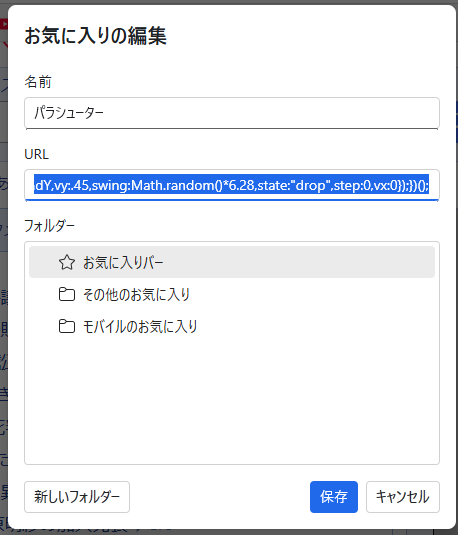
これで完成です。
たとえば、Yahooページでお気に入りをクリックすると…
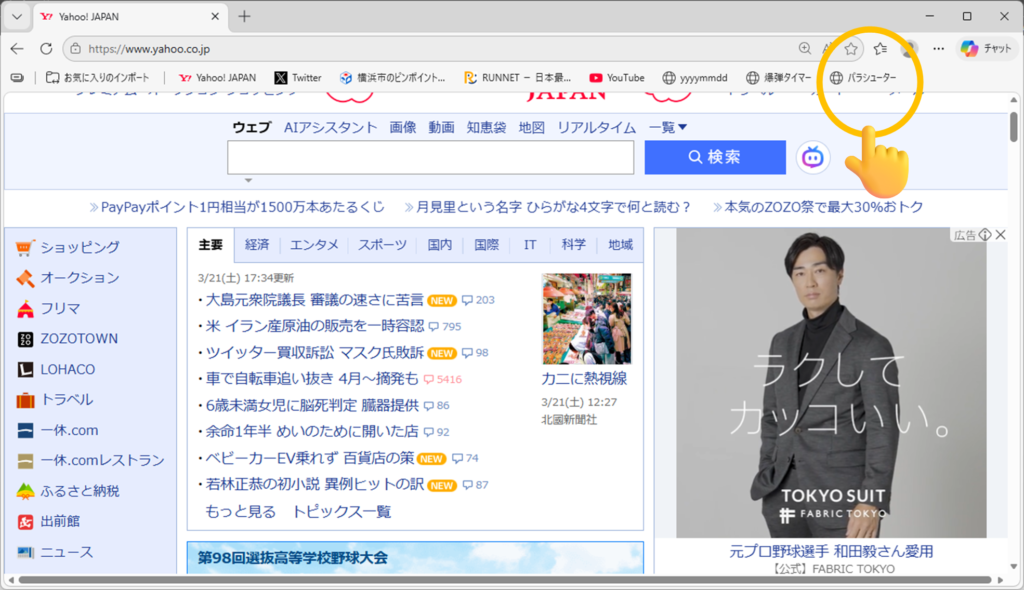
パラシューターが次々と登場します!
動画:




コメントを残す