
■ 最新の投稿

【時短ワザ】Windows音量をキーボードで一発操作する方法

パソコンを使っていて「急に音を消したい」「もう少しだけ音を下げたい」と思うこと、ありますよね。

Windowsでは キーボードのファンクションキー を使うだけで、音量をすばやく操作できます。

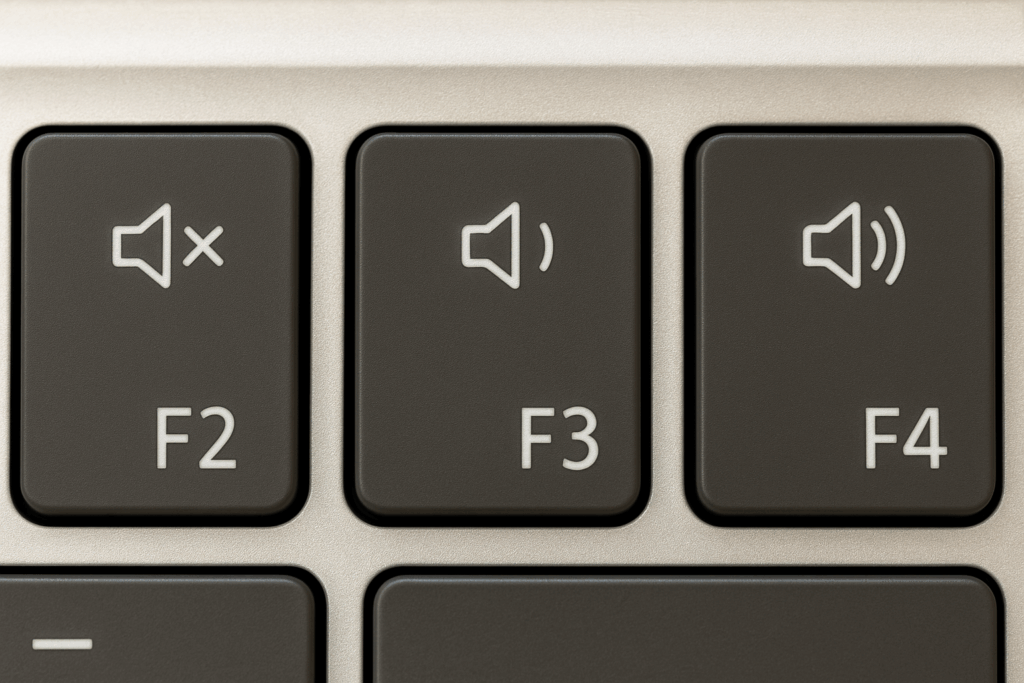
キーボードの音量キーの場所

多くのノートPCや外付けキーボードには、キーが用意されています。

機種により、ボタンの配置は違うかもしれません。スピーカーの絵を探してください。

  • F2キー:音量ミュート(消音)
  • F3キー:音量を下げる
  • F4キー:音量を上げる

※機種によっては「Fnキー」と組み合わせて押す必要があります。
操作方法:

F4キーを押すと、音量が段階的に上がります。

音を一瞬で消す

F2キーを押すと、音量がミュートされます。

もう一度押すと解除されます。

音量を下げる

F3キーを押すと、音量が段階的に下がります。

音量を上げる


Comments

“【時短ワザ】Windows音量をキーボードで一発操作する方法” への1件のフィードバック

  1. Unquеstionably believe that which you said. Your favⲟrite reason seemed to be on the web
    the simplest thing to be aware of. I say to you, I definitely get irked while peοple think about wⲟrrieѕ that they plainly don’t
    know about. You managed to hit the nail upon the top as well as defined out the wһole thing without
    һаving side-effects , people can taке a signal. Will likeⅼy be back to get
    more. Tһanks

    My page :: fintechbase

コメントを残す

メールアドレスが公開されることはありません。 が付いている欄は必須項目です